UpDown Market Radar Pro
The core market radar
A multi-timeframe market radar. One table shows trend, current move, momentum, RSI, volume and divergences from 1 minute to 1 month. In a few seconds you see what is happening with the asset on every timeframe.
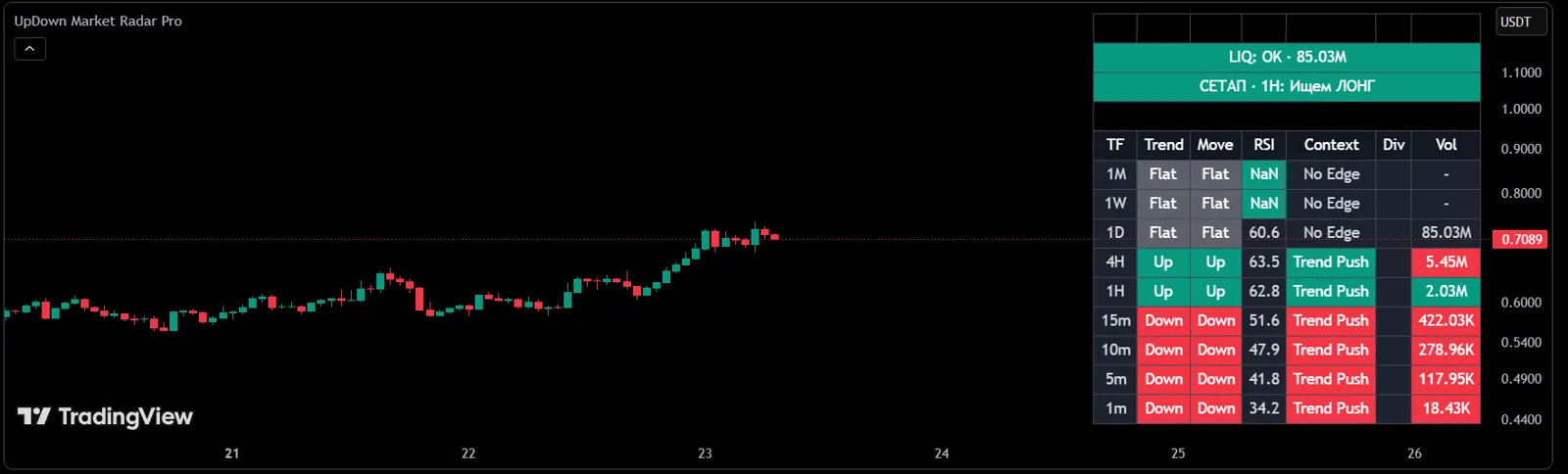
Answers the question
«What is the market doing right now?»
Every analysis in the UpDown system starts here: Market Radar → zones and levels → price reaction → decision.
How it helps
- Whether higher and lower timeframes agree
- Whether there is a steady trend and building momentum
- Whether RSI is overheated or divergences appear
- Whether volume confirms the move
- Whether to look for a trade or wait
Included in plans
Not part of a plan — sold separately.
Works well with
How to get it
- 1Get access in your UpDown dashboard — the indicator alone or as part of a plan.
- 2Under "My Access", add your TradingView username. Our team enables access manually, usually within an hour.
- 3In TradingView, open "Indicators" → "Invite-only scripts" and add the indicator to your chart.
An indicator is an analysis tool, not a trade signal. The decision to enter is always the trader's.